 Token Watch
Three ways to catch an expiring secret
1. Entra's recommendation email. Microsoft Entra can flag expiring App Registration
credentials as a "recommendation" and, in preview, email a role about it — but only once, and
only to whoever holds Application Administrator, not the app's actual owner.
2. Manually checking App registrations. The All applications list does show every app with a rolled-up status — but that status is per app, not per credential, so a flagged app still sends you into its Certificates & secrets tab to find out which secret is actually the problem.
3. Token Watch. A dashboard purpose-built for this: every credential in one sortable, filterable view, with a daily email report and a configurable expiration threshold instead of a fixed one-time notice.
If you don't want to read the details, here's how the three stack up:
| Entra recommendation email | Manual portal check | Token Watch | |
|---|---|---|---|
| Proactive? | Only if you hold the right role — and only once | No — you have to go look | Yes — daily report plus a live dashboard |
| Status granularity | Mixed in with several unrelated recommendations | One rolled-up flag per app, not per credential | Every credential shown individually, one screen |
| Reaches the app owner? | No — goes to the Application Administrator role, not the app's Owner |
Only if that person has Entra access and remembers to check | Yes, on paid plans |
| Expiration window | Fixed at 30 days | Not configurable, and Microsoft doesn't publish the threshold (visual flag only) | Configurable, 1–120 days |
| Sortable / filterable? | No | No — the status column can't be sorted or filtered | Yes — by urgency and by status |
| Repeats until fixed? | No — sent once, when the recommendation first appears | N/A — whenever you happen to check | Yes — every day until the credential is rotated |
Method 1: the “Renew expiring application credentials” recommendation
Microsoft Entra ID analyzes your tenant's configuration once a day and surfaces recommendations for anything that drifts from best practice. One of them is Renew expiring application credentials, and Microsoft's own documentation is specific about the trigger: an application credential counts as expiring if "it's on an application registration AND is expiring within the next 30 days." That number isn't a default you can raise or lower — it's the only threshold this feature has.
The recommendation at a glance, per Microsoft's own documentation:
| Where it lives | Entra ID > Overview > Recommendations |
|---|---|
| Status | Preview |
| Identity Secure Score? | No. It's an Entra recommendation, not a Secure Score item. |
| What it covers | Credentials on app registrations expiring within the next 30 days. Credentials on service principals have a separate recommendation, Renew expiring service principal credentials. |
Preview. Sent to users holding Application Administrator when the recommendation is generated; none if nobody is active in that role. |
|
| License | Not listed in Microsoft's recommendations table. The sample API response lists requiredLicenses: microsoftEntraWorkloadId, and license terms for preview recommendations can change. |
| Graph API | applicationCredentialExpiry under GET /beta/directory/recommendations, with DirectoryRecommendations.Read.All |
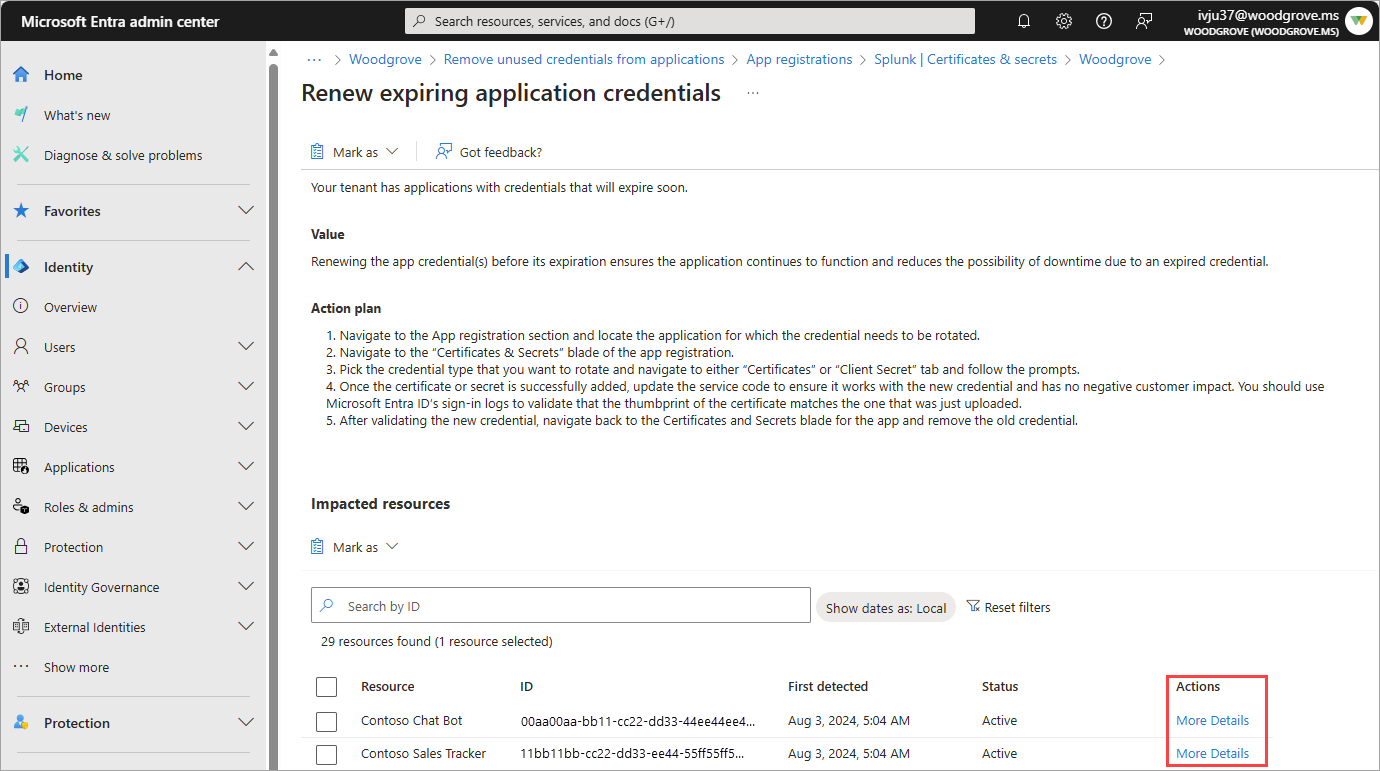
The recommendation itself just sits in the Entra ID > Overview > Recommendations blade until
someone opens the portal and looks. What actually gets you close to a real alert is a newer, separate
capability: email notifications for recommendations, currently in preview. When a new recommendation
is generated, Entra emails a predetermined set of roles. For the
credential-renewal recommendation specifically, that role is Application Administrator.
Application Administrator is a tenant-wide admin role — not the same thing as the
Owner field on an individual app registration. A developer who owns one app but
doesn't hold that role gets nothing. Microsoft's docs are explicit about this design: the recommendation
is "sent to users who have the Application Administrator role," full stop.
Three things make this a weak substitute for a real alert:
-
It's not scoped to credential expiry. The same
Application Administratorrole is also the notification target for at least half a dozen other recommendations — unused applications, apps still calling the retiring Azure AD Graph API, apps that need migrating off AD FS, and more. Credential expiry arrives mixed in with all of it, in whatever inbox the admin happens to check. - It fires once, not on a schedule. The email goes out when the recommendation is first generated for your tenant. It is not a recurring digest, and Microsoft explicitly recommends "checking the recommendations regularly" yourself rather than relying on the email alone.
-
It depends on someone actually holding the role. If you use Privileged Identity
Management and nobody is actively elevated into
Application Administratorat the moment the recommendation fires, Microsoft's docs say plainly: "no emails are sent."
There's also a data-freshness catch that has nothing to do with email: the analysis runs on a rolling 24-hour window, and Microsoft notes that "data synchronization may extend up to 72 hours." A secret that just started expiring might not show up as a recommendation — or trigger an email — for a few days.
Method 2: manually checking App registrations
The reliable native option is to go look yourself. Open Entra ID > App registrations >
All applications and every registered app is listed with a Certificates & secrets
column — a status like Current, or a warning once something on that app is expiring or
expired. Anyone with visibility into App registrations can see it, which is the one real advantage
over the recommendation email: an individual app owner doesn't need the
Application Administrator role, just read access to the app.
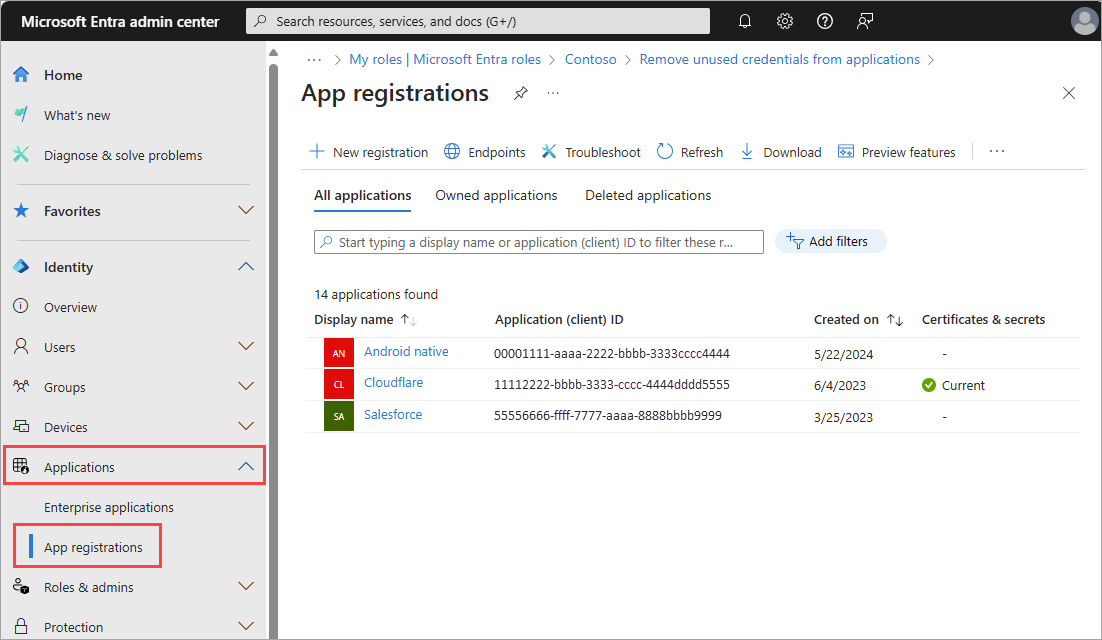
The catch is that the status is rolled up per app, not per credential. An app with three secrets and one certificate shows a single flag — it tells you something on that app needs attention, not which secret, when it actually expires, or whether you're already in the middle of rotating it. There's also no way to sort or filter the list by that column, so on a tenant with dozens of apps you're scanning the whole list by eye. Either way, you end up opening the app's own Certificates & secrets tab — where each individual credential does get its own amber-for-expiring or red-for-expired flag — to find the actual answer. It's a lookup, not a notification, and re-checking it is entirely on you.
Method 3: Token Watch
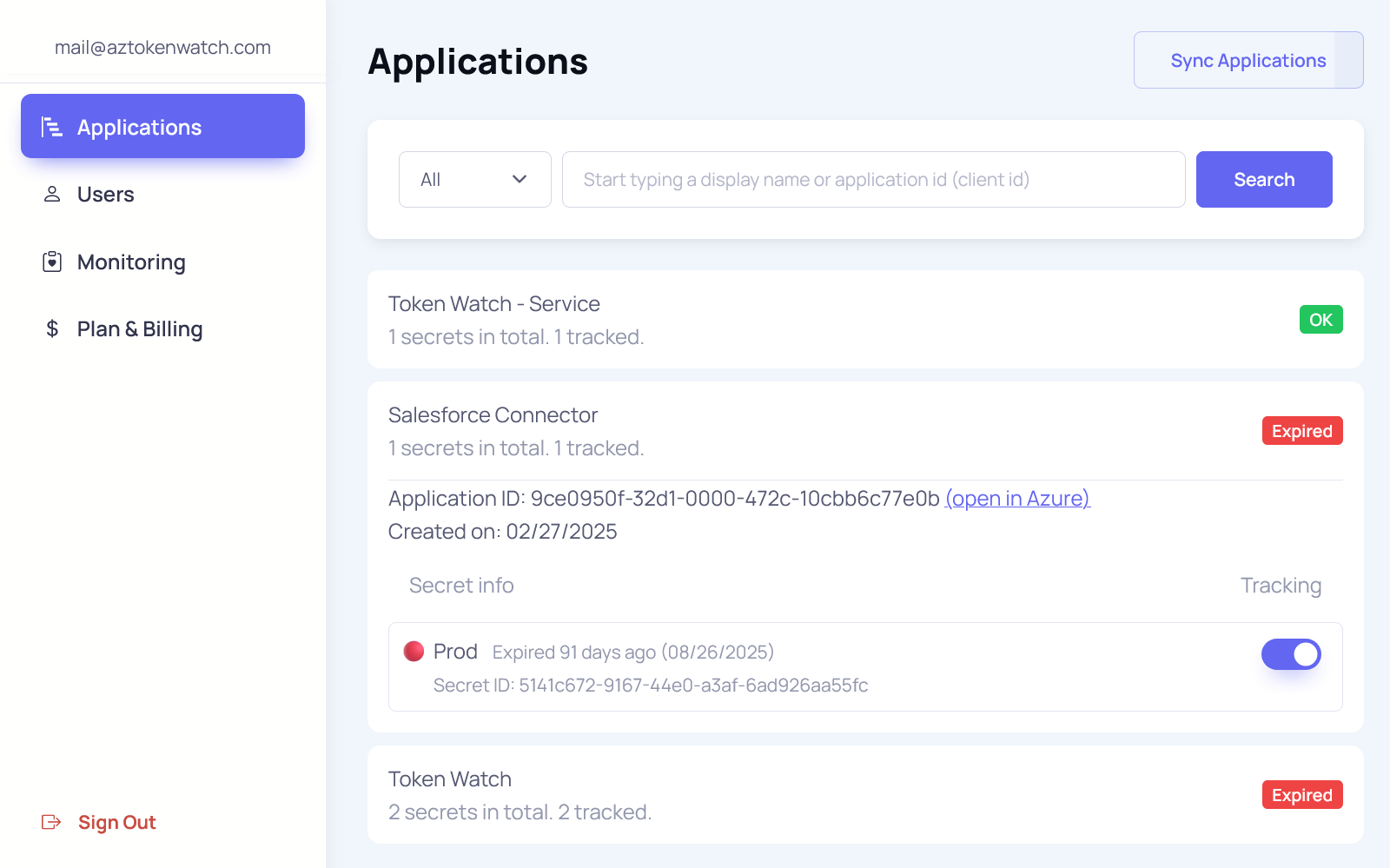
Token Watch exists specifically to close this gap. It connects to your Microsoft Entra ID tenant with read-only Microsoft Graph access, syncs every App Registration's secrets and certificates, and gives you one screen instead of one blade per app.
A few differences from both native paths:
- Per-credential detail, not a rolled-up flag. The dashboard orders applications by urgency and filters by status, and expands each app to show every secret and certificate individually — no need to open Certificates & secrets in Azure just to find out which one is actually expiring.
- Email alerts out of the box. A daily report of everything expired or expiring — not a one-time notice when a recommendation first appears — keeps arriving until the credential is actually rotated. See the email notifications overview for the full breakdown by plan.
- A configurable threshold. Instead of a fixed 30 days, you set the expiring window yourself, from 1 to 120 days — useful if your rotation process needs more lead time than Microsoft's default assumes.
- Notifications to application owners, not just tenant admins — on paid plans. This is the piece Entra's recommendation email structurally can't do, since it targets a role rather than the person responsible for a given app.
Token Watch doesn't renew or rotate anything for you — it makes sure the right person knows in time to do it themselves. If you'd rather push alerts into Slack, Teams, Azure DevOps work items, or a signed webhook instead of (or alongside) email, those channels build on the same underlying monitoring.
Which one should you use?
They're not mutually exclusive, and there's no harm in leaving Entra's native recommendation running. But as your only line of defense, it has three structural gaps: it's bundled with unrelated recommendations, it targets a role instead of an app owner, and it only fires once. For a single side project, the manual check might be enough.
For anything with more than a handful of app registrations, or where an expired secret failing in production means real business cost (lost revenue, a breached SLA, a support queue nobody can keep up with), you want a tool built specifically to monitor credential expiry and alert you before it happens. That's the difference between finding out before the incident and finding out from AADSTS7000222 in your error logs.
FAQ
Application Administrator role, only once when the recommendation is first generated, and mixed in with several unrelated recommendations. There is no recurring, credential-only notification built in.
Application Administrator role tenant-wide — not the individual app registration's Owner. If you use Privileged Identity Management and nobody is elevated into that role when the recommendation fires, Microsoft's own documentation confirms no email is sent at all.
requiredLicenses: microsoftEntraWorkloadId, which points to Microsoft Entra Workload ID rather than P1 or P2. License terms for preview recommendations can change, so the practical test is whether it shows up under Entra ID > Overview > Recommendations in your tenant.
Application Administrator), not at whoever is listed as the app's Owner. Token Watch supports per-owner notifications on paid plans, which is the more practical fit for teams where different people own different applications.